Title here
Summary here
Mar 15, 2025 · 14 min read

Tests play a crucial role in maintaining code quality and ensuring the stability of a project. They provide a safety net when making changes or refactoring code — if the test suite passes, you gain confidence that the application is functioning correctly and is safe to release.
However, just like the source code itself, tests require ongoing maintenance and refactoring. Over time, test infrastructure and architecture can become as complex as the application’s codebase, consuming quite big resources.
Unit tests are lightweight and fast, designed to verify small, isolated units of code. They achieve this by mocking dependencies, focusing only on a single logical business unit. Since they don’t interact with external systems, they are efficient and easy to execute.
In contrast, integration and end-to-end (E2E) tests operate differently. Instead of mocking dependencies, they interact with real infrastructure components, such as databases, APIs, and external services. This makes them more resource-intensive and slower to execute compared to unit tests.
For instance, when running integration tests, a real database instance is typically used to validate application behavior under realistic conditions. This ensures correctness but also introduces challenges related to execution time, resource allocation, and scalability — especially as the test suite grows.
When writing integration tests, using a real database is beneficial as it helps validate the interaction between the application code and the database infrastructure. Since most applications heavily rely on databases, it is crucial to test database integration — especially when dealing with custom SQL queries, EF Core query translations, and database-specific behaviors.
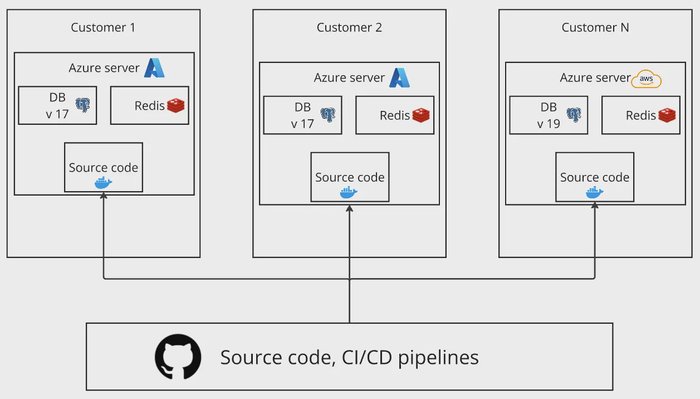
In one of my previous projects, we deployed the application on customer-dedicated servers rather than a centralized cloud infrastructure. As the number of hosted servers grew, we faced a unique challenge — our customers were running different versions of the database server. Some were fully updated, some were in the migration process, and others were still using older versions.
At that time, we were using PostgreSQL (PGSQL), which had frequent major version releases — sometimes introducing significant changes each month. Our codebase had to support multiple PostgreSQL versions simultaneously, creating an increasingly complex testing environment.
Initially, this wasn’t an issue, as most of our database queries followed standard patterns. However, when we started incorporating custom SQL scripts, we encountered compatibility problems across different PostgreSQL versions. Queries that worked on one version failed on another, forcing us to rethink how we validated database interactions in our tests.
PostgreSQL function compatibility error in production.
For local development, we always used the latest version of PostgreSQL (PGSQL). After running tests locally, we deployed to development and staging environments, where we validated that everything was working as expected. However, when we released the changes to a customer’s environment, we encountered a strange error:
SQL exception: json_extract_path_text is not a functionAfter checking the documentation, we realized that this function wasn’t available in the PostgreSQL version running in the customer’s environment. It was introduced in a later release, but since the customer’s database hadn’t been upgraded yet, the query failed.
To fix this, we refactored the code to use a function available in all supported PostgreSQL versions. This issue highlighted a major gap in our testing strategy — our test architecture wasn’t mature enough to catch such compatibility issues before deployment.
To prevent similar problems in the future, we enhanced our integration test suite by including multiple PostgreSQL versions as additional test cases for database-related functionality. This ensured that our queries and database interactions were validated across all supported versions before deployment.
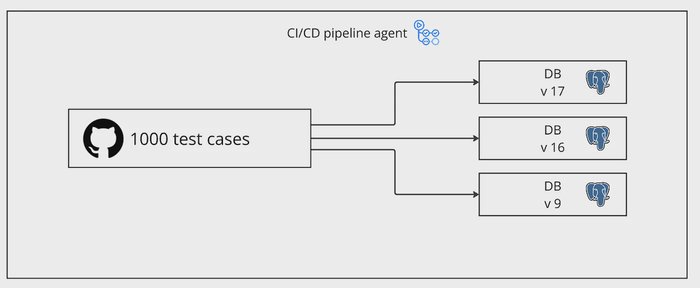
Integration test matrix across PostgreSQL versions.
This change significantly increased the number of test cases, as each database version required its own set of tests. For example, if we initially had 1,000+ test cases, running them across three different PostgreSQL versions tripled the total number of executed tests — bringing it to 3,000.
As a result, the test execution time also tripled, making our CI pipeline slower and resource-intensive. This created a new challenge: while we had improved test coverage and ensured compatibility across database versions, we also introduced a time bottleneck in our development workflow.
This is where test sharding became a necessary optimization
Before optimizing test execution with sharding, we first set up a standard CI pipeline to run tests sequentially.
In this scenario, we have multiple microservices, each containing integration tests that validate their behavior. These services include endpoints that may perform long-running operations, introducing delays during test execution.
For testing, we maintain multiple integration test projects, each containing multiple test files with several test cases. To simulate a high test execution load, each test case is executed multiple times, significantly increasing the overall test suite size.
Consider a scenario where we have 500 test cases across the solution. If each test takes 5 seconds to execute, the total execution time would be:
500×5 = 2500 seconds = 40 minutes
However, .NET test execution is optimized for concurrency — even when running tests on a single machine, dotnet test executes them in parallel based on available system resources. As a result, the total execution time would be significantly lower than 40 minutes, typically around 15 minutes in a single shard.
If GitHub-hosted runners had unlimited computing power, we might not need sharding at all — .NET test would efficiently parallelize execution on a single machine. But in reality:
Here’s a basic GitHub Actions workflow that runs tests by executing dotnet test on the solution file (.sln). This setup follows a straightforward, non-sharded approach, meaning all tests run sequentially in a single job
basic_test.yaml
name: Dotnet test with basic setup
on: [workflow_dispatch]
jobs:
  build:
    runs-on: ubuntu-latest
    steps:
      - uses: actions/checkout@v4

      - name: Setup dotnet
        uses: actions/setup-dotnet@v4
        with:
          dotnet-version: '8.0.x'
      - name: Display dotnet version
        run: dotnet --version
      - name: Dotnet test
run: dotnet test ./dotnet-test-sharding.slnSince .NET does not provide native support for test sharding or test splitting, we need to implement it manually. Fortunately, xUnit offers a way to categorize and filter tests, which we can leverage for sharding.
In xUnit, the standard way to categorize tests is by using the [Trait] attribute. This allows us to tag test cases with specific categories and subcategories, making it easier to filter and execute a subset of tests independently.
[Fact]
[Trait("UI", "Front")]
public void Add_ReturnsTheCorrectResult()
{
    Assert.True(_sut.Add(1, 1) == 2);
}
[Fact]
[Trait("UI", "Back")]
public void Add_ReturnsTheCorrectResult2()
{
    Assert.True(_sut.Add(5, 1) == 7);
}
Understanding [Trait] Arguments
"Category")."UI", "Front", "Back").Traits allow us to categorize tests and logically split them into shards or groups. The [Trait] attribute can be applied at different levels:
This means we can shard our existing integration test projects without big code changes. To implement sharding, we define a new Trait category called "Shard" and assign values to our test projects:
**Shard=1** for the first test project**Shard=2** for the second test projectHere comes the question: Why Not Use Project Names Directly? While it’s possible to filter tests by project name, using Traits provides flexibility.
For example, let’s say we have 4 test projects, and only three of them require a real database:
By applying the **[Trait("Shard", "1")]** attribute at the assembly level for Projects 1 & 2, and at the class level for only the relevant tests in Project 3, we can ensure that:
"Shard=1"There are 2 options to apply traits to the whole assembly
AssemblyInfo.cs[assembly: Trait("Shard", "1")]
.csproj level:IntegrationTest1.csproj
<ItemGroup>
    <AssemblyAttribute Include="Xunit.AssemblyTrait">
        <_Parameter1>Shard</_Parameter1>
        <_Parameter2>1</_Parameter2>
    </AssemblyAttribute>
</ItemGroup>
IntegrationTest2.csproj
<ItemGroup>
    <AssemblyAttribute Include="Xunit.AssemblyTrait">
        <_Parameter1>Shard</_Parameter1>
        <_Parameter2>2</_Parameter2>
    </AssemblyAttribute>
</ItemGroup>
and now we can run them using this script:
dotnet test ./dotnet-test-sharding.sln --filter Shard=1This command will run only the test cases that were marked with Shard=1.
Now, as we have sharding in place, we can adjust the GitHub action to run using matrix and generate a job for each shard.
shard_tests.yaml
name: Run tests with sharding
on:
  workflow_dispatch: {}
jobs:
  test:
    runs-on: ubuntu-latest
    strategy:
      fail-fast: false
      matrix:
        shards: ['1', '2']

    steps:
      - uses: actions/checkout@v4

      - name: Setup dotnet
        uses: actions/setup-dotnet@v4
        with:
          dotnet-version: '8.0.x'
      - name: Display dotnet version
        run: dotnet --version
      - name: Dotnet test
        run: dotnet test ./dotnet-test-sharding.sln --filter Shard=${{ matrix.shards }}
With this setup, when we trigger the workflow, GitHub automatically generates multiple jobs (in our example 2 jobs), each executing the same steps defined in the workflow’s steps section.
Since we are using matrix strategy for sharding, each job runs independently, but with a different shard value, ensuring that only a subset of tests is executed per job.
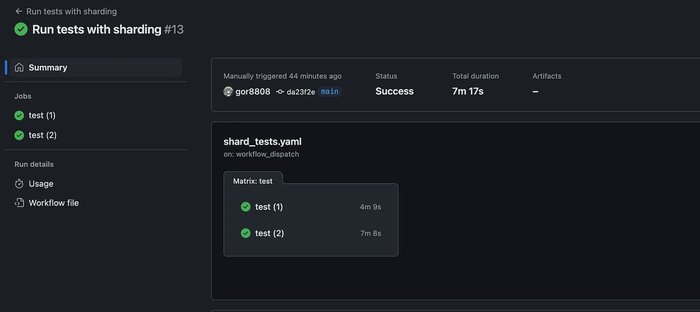
GitHub Actions matrix jobs created for test shards.
Now that we have test execution distributed across shards, the next challenge is generating a unified test report once all shards complete.
A useful tool for this is EnricoMi/publish-unit-test-result-action , which takes raw dotnet test outputs and converts them into a well-formatted test report. It works by collecting test results and posting a comment on the PR with a summary of test execution, making it easy to review.
The Challenge with Sharding is that each shard (job) runs on an isolated GitHub runner, meaning that:
To solve this, we need a post-action job that collects all test results from different shards and merges them into one report. This job will:
publish-unit-test-result-action.GitHub Actions provides a native way to define dependencies between jobs, ensuring that a job only starts after specific jobs are completed. This is achieved using the needs keyword. To collect and aggregate test results after all shards finish, we introduce a publish-test-results that depends on the test execution jobs. Here’s how it looks:
name: Run tests with sharding
on:
  workflow_dispatch: {}
jobs:
  test: # <--- Job name
    runs-on: ubuntu-latest
    strategy:
      fail-fast: false
      matrix:
        shards: ['1', '2']

    steps:
      - uses: actions/checkout@v4

      - name: Setup dotnet
        uses: actions/setup-dotnet@v4
        with:
          dotnet-version: '8.0.x'
      - name: Display dotnet version
        run: dotnet --version
      - name: Dotnet test
        run: dotnet test ./dotnet-test-sharding.sln --filter Shard=${{ matrix.shards }}
  publish-test-results:
    if: always() # <-- Run even if tests executin are failing
    needs: test # <--- Needs test job to be done to start the publish-test-results job
    runs-on: ubuntu-latest
    steps:
      - uses: ........
We previously defined a job called test, which executes our test shards. Now, we have added a new job called publish-test-results, responsible for aggregating and reporting test results.
Key Configurations in publish-test-results:
if: always(): Ensures that the job runs even if some test jobs fail, allowing us to generate a test report regardless of test outcomes.needs: test: Specifies that this job should only start after all test jobs have completed, ensuring it waits for all shards to finish before execution.With this setup, GitHub Actions will automatically queue the publish-test-results job, ensuring it runs only after all instances of the test job are completed, regardless of individual test pass/fail status.
Before we can aggregate test results, we first need to modify our dotnet test command to generate and store test outputs in a specific directory. This ensures that each test job saves its results in a structured location for later collection.
Updated dotnet test Command:
dotnet test ./dotnet-test-sharding.sln --filter Shard=${{ matrix.shards }} -c Release -l trx --results-directory 'artifacts/tests/output'Explanation of Added Arguments:
-c Release: Runs tests in Release mode for optimized performance.-l trx: Generates detailed test logs in TRX format, making them easier to process later.--results-directory 'artifacts/tests/output': Saves all test results in the specified folder, ensuring consistency across all shards.This will give us this picture:
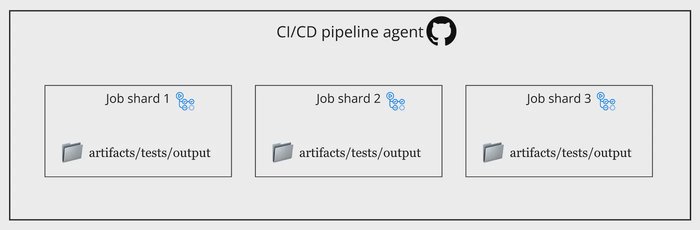
TRX outputs saved to artifacts/tests/output.
GitHub Actions provides a built-in way to store and transfer files between jobs using the actions/upload-artifact and actions/download-artifact steps.
Artifacts can be configured with a retention period, but in our case, the default settings are sufficient since we only need to transfer test results between jobs within the same workflow execution. After running tests, we upload the generated test results so they can be collected and processed later.
- name: Dotnet test
  run: dotnet test ./dotnet-test-sharding.sln --filter Shard=${{ matrix.shards }} -c Release -l trx --results-directory 'artifacts/tests/output'
- name: Upload test artifacts
  uses: actions/upload-artifact@v4
  if: ${{ success() || failure() }}
  with:
    name: test-results
path: artifacts/tests/output/**--results-directory flag, storing test results in artifacts/tests/outputupload-artifact step takes all files from artifacts/tests/output/ and stores them as an artifact named test-results.${{ success() || failure() }} ensures that artifacts are uploaded even if tests fail, so we don’t lose test results in case of failuresWhile uploading test results as artifacts, we face a limitation in GitHub Actions:
test-results), they will overwrite each other or fail.To solve this, we can generate a unique identifier (UUID) for each job and attach it to the artifact name.
- name: Dotnet test
  run: dotnet test ./dotnet-test-sharding.sln --filter Shard=${{ matrix.shards }} -c Release -l trx --results-directory 'artifacts/tests/output'
- name: Set UUID
  if: ${{ success() || failure() }}
  id: generate-uuid
  uses: filipstefansson/uuid-action@v1
- name: Upload test artifacts
  uses: actions/upload-artifact@v4
  if: ${{ success() || failure() }}
  with:
    name: test-results-${{ steps.generate-uuid.outputs.uuid }}
    path: artifacts/tests/output/**
How It Works?
artifacts/tests/output/filipstefansson/uuid-action@v1 step generates a random UUIDtest-results-<UUID>, preventing conflicts between multiple jobs.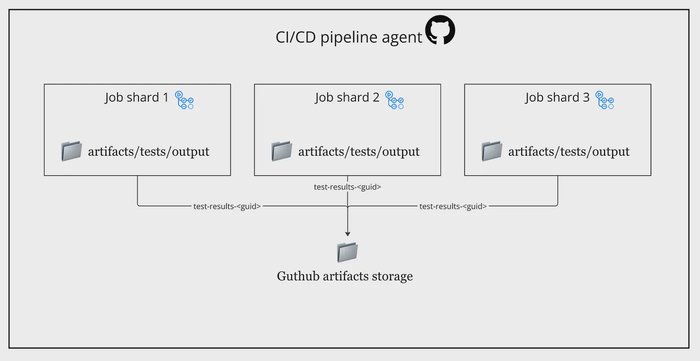
Unique artifact names per shard using UUID.
Now we can download the artifacts and generate a test output
publish-test-results:
  if: always()
  needs: test
  permissions: write-all
  runs-on: ubuntu-latest
  steps:
    - name: Download test artifacts
      uses: actions/download-artifact@v4
      with:
        path: artifacts/tests/output
    - name: Publish test results
      uses: EnricoMi/publish-unit-test-result-action/linux@v2
      if: ${{ success() || failure() }}
      with:
        files: artifacts/tests/output/**/*.trx  # Path to downloaded test results
        large_files: true  # Allows handling large test result files
        check_name: "Test results"  # Name for the GitHub report
        report_individual_runs: true  # Shows individual test run details
        action_fail: true  # Fails the job if test failures are detected
        time_unit: milliseconds  # Ensures precise reporting of test duration
compare_to_earlier_commit: false # Disables comparison with previous commits 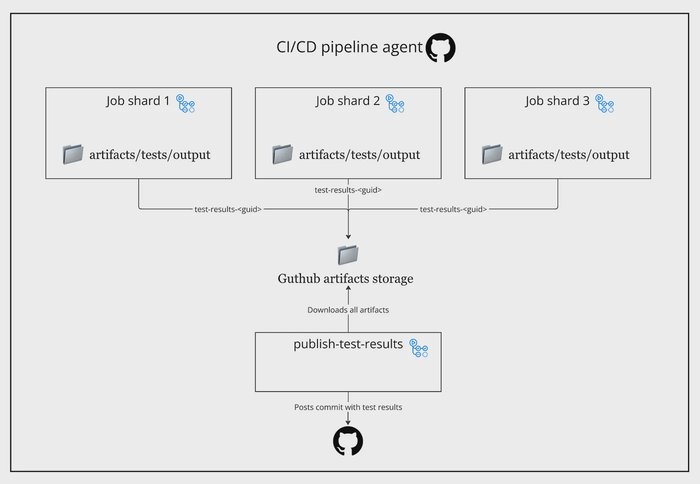
Downloaded shard artifacts and merged test report output.
The complete GitHub Actions workflow operates as follows:
name: Run tests with sharding
on:
  workflow_dispatch: {}
  pull_request: {}
jobs:
  test:
    runs-on: ubuntu-latest
    permissions: write-all
    strategy:
      fail-fast: false
      matrix:
        shards: ['1', '2']

    steps:
      - uses: actions/checkout@v4

      - name: Setup dotnet
        uses: actions/setup-dotnet@v4
        with:
          dotnet-version: '8.0.x'
      - name: Display dotnet version
        run: dotnet --version
      - name: Dotnet test
        run: dotnet test ./dotnet-test-sharding.sln --filter Shard=${{ matrix.shards }} -c Release -l trx --results-directory 'artifacts/tests/output'
      - name: Set UUID
        if: ${{ success() || failure() }}
        id: generate-uuid
        uses: filipstefansson/uuid-action@v1
      - name: Upload test artifacts
        uses: actions/upload-artifact@v4
        if: ${{ success() || failure() }}
        with:
          name: test-results-${{ steps.generate-uuid.outputs.uuid }}
          path: artifacts/tests/output/**

  publish-test-results:
    if: always()
    needs: test
    permissions: write-all
    runs-on: ubuntu-latest
    steps:
      - name: Download test artifacts
        uses: actions/download-artifact@v4
        with:
          path: artifacts/tests/output
      - name: Publish test results
        uses: EnricoMi/publish-unit-test-result-action/linux@v2
        if: ${{ success() || failure() }}
        with:
          files: ${{ env.TEST_RESULTS }}/**/*.trx
          large_files: true
          check_name: "Test results"
          report_individual_runs: true
          action_fail: true
          time_unit: milliseconds
          compare_to_earlier_commit: false
1️⃣ When a PR is created, GitHub Actions automatically starts the test jobs. The workflow generates multiple parallel test shards, each executing a portion of the test suite
2️⃣ Each test shard executes independently. Once all test jobs finish, GitHub Actions triggers the publish-test-results job
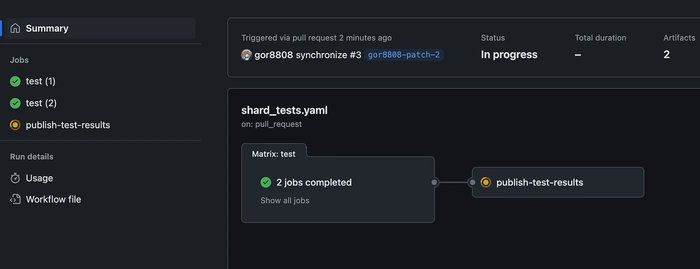
Parallel shard jobs completed in a pull request workflow.
3️⃣ After aggregating all test results, the workflow posts a detailed test summary as a PR comment. This provides clear visibility into test results directly within GitHub
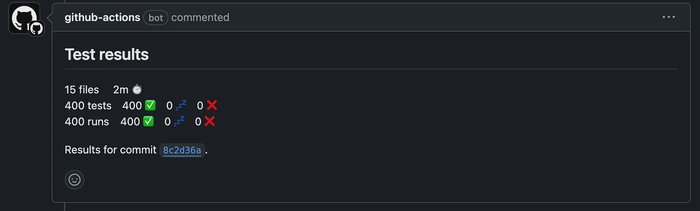
Final aggregated test summary posted to the pull request.
Check out this GitHub repo for implementation details: