Title here
Summary here
Jul 12, 2025 · 9 min read

The story of how solving “those annoying squiggly words” helped digitize The New York Times, train autonomous vehicles, and build the world’s largest AI training dataset — all while users thought they were just proving they weren’t robots.
Every day, millions of users encounter a familiar reCAPTCHA challenge: identifying traffic lights in a grid of images to prove they’re human. This simple security measure represents something far more important than spam prevention. In those 30 seconds of user interaction, participants unknowingly contribute to training Google’s autonomous vehicle AI systems.
Over the past 15+ years, humanity has collectively provided 819 million hours of unpaid labor — worth an estimated $6.1 billion in wages — all while believing the primary purpose was bot detection. This represents perhaps the most successful crowdsourcing operation in tech history, while working as a security measure.
Research Study Calculation:
The challenge of preventing automated bots from accessing websites while allowing legitimate human users through has plagued web developers since the early days of the internet. The solution appeared straightforward: create challenges that humans can solve but computers cannot.
However, Luis von Ahn, the computer scientist who created reCAPTCHA, recognized an opportunity that would reshape data collection on the internet. Rather than viewing these millions of human interactions as necessary overhead for security, he realized they represented “millions of hours of an expensive resource: human brain cycles, aka computational power” that were being wasted.

Luis von Ahn, creator of reCAPTCHA
The solution was to use this computational power for productive purposes while maintaining the security benefits.
In 2007, Optical Character Recognition (OCR) technology faced significant limitations when processing old, degraded text. Organizations like The New York Times and Project Gutenberg possessed millions of pages of archived content requiring digitization, but OCR consistently failed on text that was:
This created a problem in digitization efforts, requiring expensive manual transcription services. ReCAPTCHA provided an innovative solution to this challenge.
The original mission of reCAPTCHA went far beyond filtering out bots — it was part of a larger effort to digitize The New York Times archives and support Google Books. Rather than relying solely on algorithms, Google turned to the internet’s users, a form of human computation, into everyday web activity. Every time a user encountered a CAPTCHA, they weren’t just proving they were human — they were helping decipher words that machines couldn’t read.
ReCAPTCHA v1 displayed two words: one known and already validated (used to test whether the user was human), and one unknown, typically a word that OCR (optical character recognition) software had failed to accurately transcribe. For example, a prompt might display a clear “cat” next to a garbled piece of text from a century-old newspaper scan. The assumption was simple: if a user correctly identified the known word, their interpretation of the unknown one could be trusted.
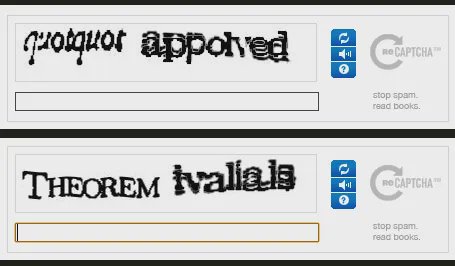
reCAPTCHA v1 displayed one known word and one unknown word for users to decipher
To ensure accuracy, Google used a clever confidence-scoring system. OCR guesses were worth 0.5 confidence points, while each human interpretation was worth a full point. Once a word accumulated at least 2.5 points — often requiring three separate human agreements — it was considered verified. This consensus mechanism allowed Google to crowdsource the decoding of difficult or degraded text at scale.
The results were staggering. ReCAPTCHA enabled the successful digitization of The New York Times archive from 1851 to 1980, processing millions of pages of text that traditional methods couldn’t handle alone. At its peak, the system was solving over 200 million CAPTCHAs daily, effectively turning the global internet population into a massive, unpaid data annotation workforce. In doing so, reCAPTCHA quietly became one of the most effective and elegant crowdsourcing strategies in tech history — helping AI learn, one distorted word at a time.
The true scale of reCAPTCHA’s advantage becomes apparent when examining the challenges faced by individual developers attempting similar digitization projects. An example is my development of an OCR system for Armenian manuscripts.
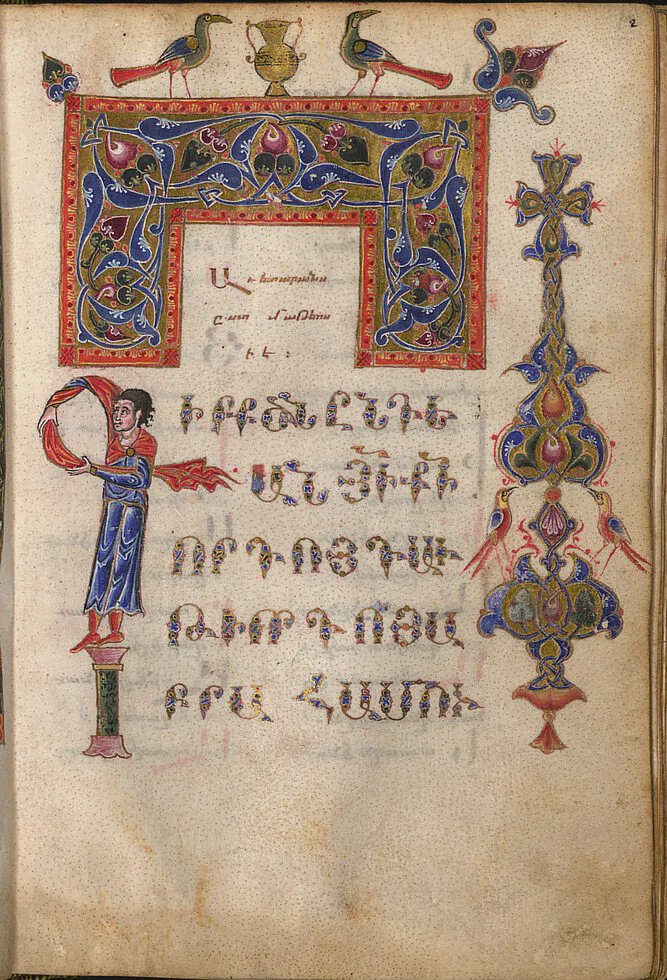
Armenian manuscript written in Grabar, the classical form of Armenian
While studying at TUMO (a technology education center), I created GAI (Grabar Artificial Intelligence), an application designed to read Armenian manuscripts written in Grabar — a classical form of Armenian used from the 5th to 19th centuries.
GAI Project Resources:
Google reCAPTCHA Resources:
Unlike Google’s access to millions of daily reCAPTCHA users, this project faced the typical constraints of individual AI development:
The GAI project required creating custom interfaces for data collection, where contributors would:
This manual approach highlights the enormous advantage that reCAPTCHA provided to Google — automatic data collection at internet scale, disguised as a security measure that users were compelled to complete for website access.
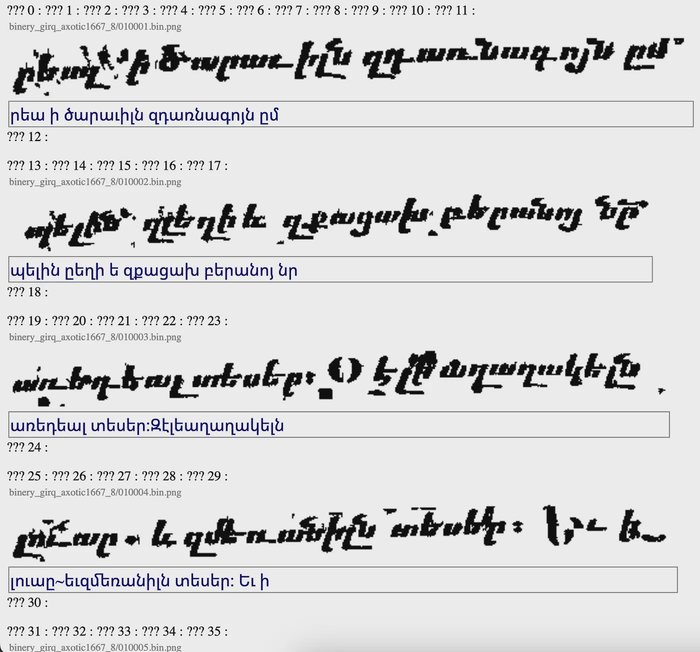
Example of the manual dataset creation interface for the GAI project
The problem was that I didn’t have the ability to use CAPTCHA and the whole internet as my employees so they can translate it as well.
Between 2014 and 2017, reCAPTCHA had a major and important transformation. By this time, advances in machine learning and OCR had made traditional text-based CAPTCHAs easy for bots to solve. At the same time, Google had new ambitions. It’s growing dependency on computer vision, especially for products like Google Street View, Google Maps, autonomous vehicle initiative. Those products required a large amount of labeled image data. Then again, as a solution, they once again let the global internet population do the heavy lifting.
ReCAPTCHA v2 shifted away from deciphering words and toward labeling real-world images. Users were now asked to “Select all squares with traffic lights,” “Click on images containing street signs,” “Identify all squares with crosswalks,” or “Select images with vehicles.” While these prompts seemed like harmless visual puzzles, they were in fact serving a dual purpose: validating the user and simultaneously training Google’s computer vision models.
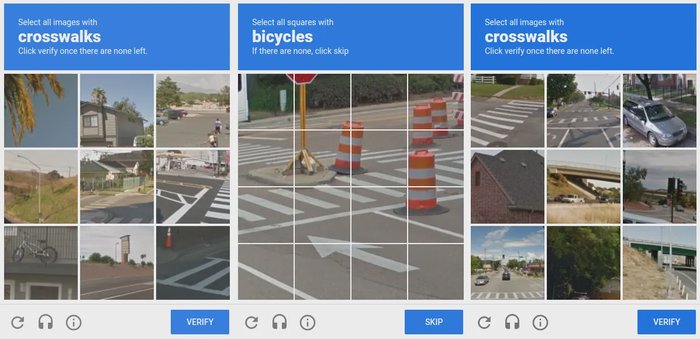
reCAPTCHA v2 shifted from text to image classification challenges
Each click helped improve object detection algorithms across multiple platforms. The responses enhanced autonomous driving systems for Waymo, refined object tagging in Google Maps, and automated image parsing in Google Street View. Millions of users unknowingly contributed to the development of smarter AI by simply clicking through what they assumed were spam-prevention measures.
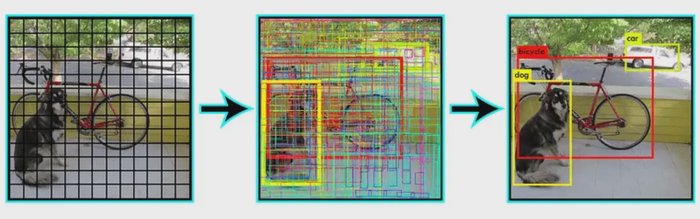
YOLO Object Detection for accurate and efficient visual recognition
To complement the visual challenges, Google also introduced behavioral analysis to improve accuracy. Instead of always prompting with image grids, reCAPTCHA v2 could sometimes verify a user with just a single checkbox: “I’m not a robot.” Behind the scenes, the system was analyzing mouse movement patterns, click timing, typing rhythm, browser fingerprinting, and the user’s historical interaction profile. If the behavior aligned with expected human norms, the user passed with no further action. But if anything seemed off — perhaps robotic or scripted — then the image challenge was triggered.
This era of reCAPTCHA marked a shift from text to visual cognition, quietly enlisting the internet in training the next generation of machine learning models — one stop sign and traffic light at a time.
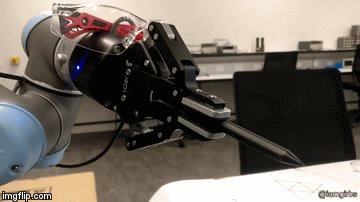
The 'I'm not a robot' checkbox hides a behavioral analysis engine
Behind the simplicity of reCAPTCHA v2’s “I’m not a robot” checkbox lies a behavioral analysis engine — one that turns even the tiniest cursor movement into biometric data. From the system’s perspective, a moving mouse is just a stream of pixel coordinates, updated at regular intervals — typically every 10 milliseconds (100 Hz), though some systems capture data as fast as every 1 millisecond (1000 Hz). While each data point seems minimal, the system can derive key metrics from this stream: the time elapsed between updates, the change in position, and from those, the velocity of movement. People move their mice at speeds between 5–10 pixels per millisecond, though this varies depending on screen resolution, mouse DPI, system settings, and context.
But speed is only part of the story. Perhaps even more telling is the shape of the movement path itself. Humans rarely move their cursors in perfectly straight lines. Instead, our trajectories are marked by hesitation, micro-corrections — results of both neurological noise and muscle precision.
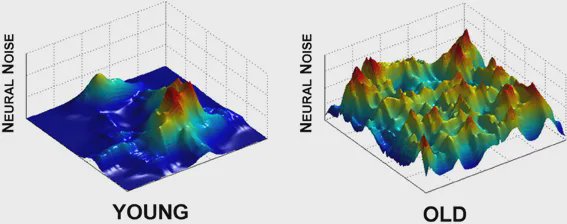
Effect of aging on neural noise modulation in motor control
This is easy to visualize in a drawing program: set the brush to 1px and try drawing a straight line quickly. The line will almost certainly reveal jitter, variation in angles, and uneven segments — characteristics that are virtually impossible to reproduce using basic automation. Bots, in contrast, often generate cursor paths via linear interpolation or replay stored motion patterns. Straight-line segments create unnatural angular distributions, and reused human-like paths break down statistically over many samples.
To counter this, some advanced bots have tried mimicking human behavior more realistically using algorithms like WindMouse , which introduces pseudo-random acceleration, deceleration, and direction changes to simulate believable cursor paths. But even these struggle to fool reCAPTCHA consistently. Google’s system doesn’t rely on one signal alone; instead, it builds a composite risk score based on dozens of inputs — cursor behavior, timing, screen interaction, browser fingerprinting, and sometimes cross-site history. In many cases, it doesn’t even need to ask you to solve a puzzle — the way you move your mouse is enough to prove you’re human.